Ranking without tracking is guessing. The right rank tracker turns search visibility into a measurable growth engine, so you can prioritize, prove ROI, and win budget.
This guide explains how rank tracking works, which features matter, how to select the best keyword tracking tools for your use case, and how to connect rankings to revenue. You’ll also see how to pair your tracker with AI-driven content from SEOsolved for a full-funnel SEO machine.
Rank Tracker Basics: What, Why, and When It Matters
A rank tracker (also called a website rank tracker or SERP tracker) monitors where your pages appear for specific queries across search engines, locations, and devices. It’s foundational for tracking SEO because it shows whether your content is gaining visibility and if you’re outranking competitors.
What is a rank tracker?
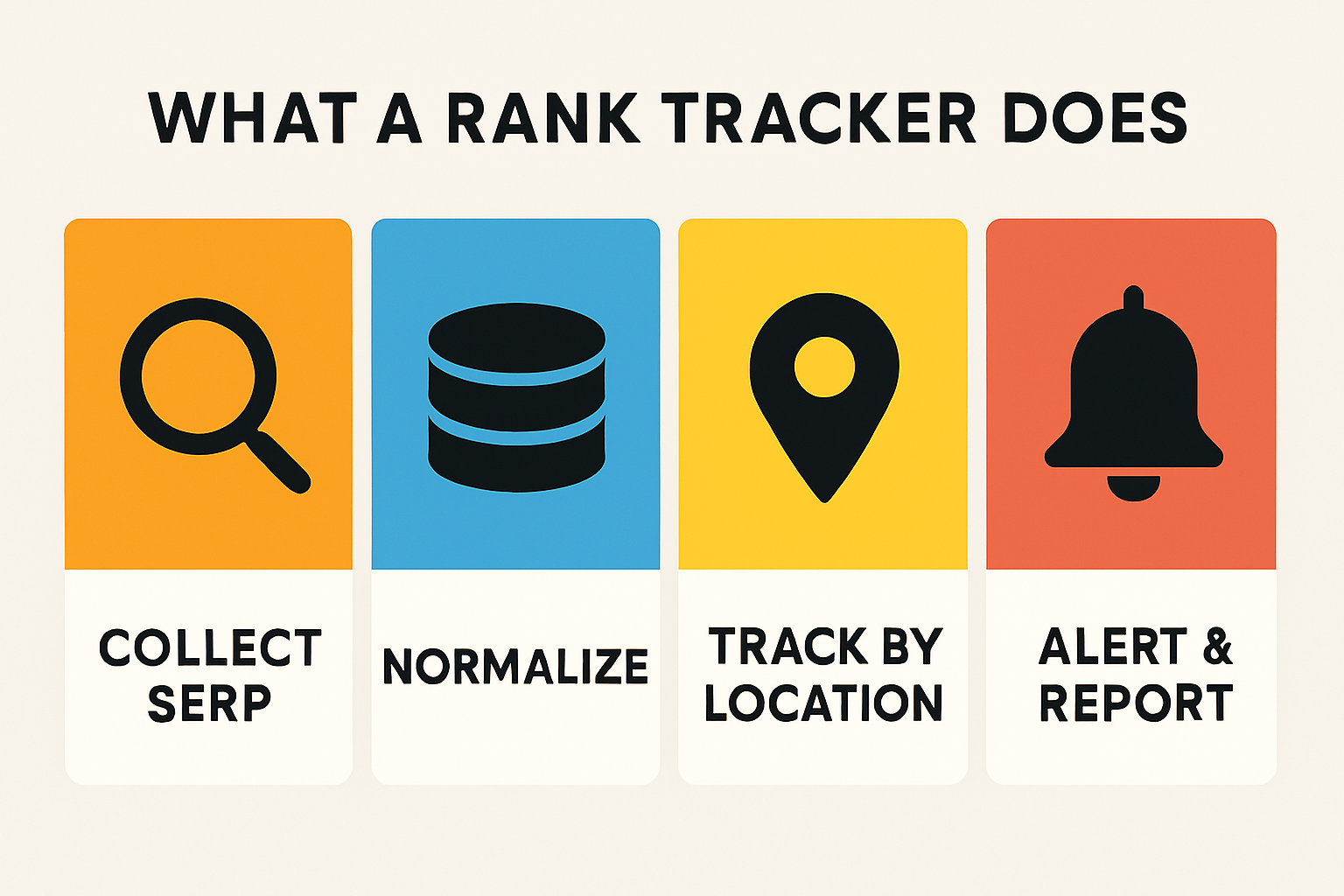
Definition: A rank tracker is a keyword position tool that collects SERP data from search engines, normalizes it by location/device, and trends your positions over time.
Monitors target queries with a keyword tracker across Google and Bing.
Captures desktop vs. mobile and local map pack results.
Tracks rank movements, SERP features, and competitor positions.
Surfaces daily or on-demand changes with rank monitor alerts.
When to start tracking keyword rankings
New product/feature launches: Validate messaging and find quick-win terms with daily keyword tracking.
Content campaigns: Track cohorts for new clusters, landing pages, and blogs with real-time keyword tracking during rollout.
Local SEO initiatives: Monitor Google Business Profile (GBP) and map pack visibility city-by-city.
Seasonality or promos: Watch rank volatility during peak demand.
How rank tracking ties to content performance and ROI
Rankings tell you where you appear. To prove revenue, map position changes to impressions, clicks, and conversions:
Blend tracker data with Search Console query-level metrics.
Layer in GA4 goals/transactions to quantify impact.
Use cohort dashboards by topic cluster and publish month to show pipeline lift.
For a practical walkthrough, see how to build a GA4 content dashboard that connects rankings to outcomes.
How Rank Tracking Works (Accuracy, Frequency, and Scope)
Trustworthy rank data depends on clean collection, precise location/device settings, appropriate update frequency, and coverage of SERP features.
SERP data sources and search engines
Most tools focus on Google but many also support Bing, Yahoo, Yandex, and Baidu. Confirm regional indexes and language coverage if you serve international audiences.
Google rank tracker: Primary source for most markets.
Bing rank tracker: Useful for B2B and older demographics.
Yahoo keyword rank checker: Often mirrors Bing results.
Yandex and Baidu: Consider for Russia/CIS and China, respectively.
Device and location: desktop vs. mobile, city/ZIP, and map pack
Mobile results, local intent, and proximity can dramatically change positions. For local keyword rank tracking, insist on city, ZIP, or even GPS-level granularity to capture Google Maps/GBP rankings.
Some trackers support street-level checks and hyper-precise targeting, helpful for franchises and service-area businesses.
Geo-grid visuals (heat maps) show rank across a neighborhood or city, revealing proximity and competition pockets.
See how geo-grids and precision targeting work in local tracking roundups from Rankings.io.
Freshness: daily vs. real-time checks
Daily keyword rank tracking is sufficient for most teams. Use on-demand refresh when:
Testing title changes or new content rollouts.
Monitoring algorithm updates or SERP instability.
Reporting at high frequency to stakeholders.
Tracking SERP features and snippets
Modern SERPs include featured snippets, People Also Ask, local packs, video carousels, and Top Stories. Choose a best SERP rank tracker that reports feature presence and ownership so you can optimize CTR with a snippet optimizer approach.
Types of Rank Trackers and Who They’re For
Match deployment, scale, and reporting needs to the right class of keyword tracking software.
Web-based and cloud rank tracker platforms
Pros: multi-user access, scheduled reports, APIs, lower maintenance.
Best for: agencies, in-house teams, and multi-market brands.
Desktop keyword rank checker software
Pros: offline control, one-time licenses, custom workflows.
Cons: IP/rate limits, hardware dependence, fewer collaboration features.
Best for: solo SEO practitioners, small sites, specific audits.
Agency and white-label solutions
Client portals, branded PDF/Slides, and automated keyword rank reports.
Portfolio-level dashboards to compare projects and share of voice.
Enterprise/API-first rank trackers
High-volume tracking with SLAs, unlimited keyword tracking options, and BI-ready exports.
Data joins with analytics and CDPs for advanced modeling.
Specialized trackers: local, YouTube, App Store, international
Local SEO: grid-based visibility, GBP categories, and proximity insights.
YouTube: video rankings for titles, tags, and thumbnails.
App Store/Google Play: category and keyword positions.
International: Yandex/Baidu, script handling, and regional engines.
Feature Checklist: How to Choose the Best Rank Tracker
Evaluate these features to pick the best rank tracker for your goals.
Location precision and proximity for local SEO
Grid-based checks and radius controls for neighborhood-level accuracy.
Support for Google local rank tracking and map packs.
Keyword management: tags, groups, and difficulty
Labels and folders for clean segmentation by funnel stage and topic.
Rank tracker keyword difficulty to prioritize realistic wins.
Reporting, alerts, and schedules
Automated weekly PDFs and stakeholder-ready dashboards.
Daily keyword tracking alerts for major movements.
Competitor tracking and share of voice
Compare positions, SERP features owned, and visibility trends.
Market share/SOV metrics to benchmark progress.
Integrations and exports (GSC, GA4, Sheets, Looker Studio)
Import Search Console queries; export to Sheets and Looker Studio.
Connect rankings to GA4 conversions to elevate SEO from vanity to value.
Budget and limits: pricing models and data caps
Understand per-keyword, per-project, and tiered pricing.
Confirm data caps, refresh frequency, and historical lookback.
Fast win: If you need a quick primer on tooling beyond tracking, see our SEO tools in 2025 guide.
CTA: Ready to turn insights into rankings? Stat Ranking Today with SEOsolved.
The 2026 Shortlist: Best Rank Tracking Tools Compared
Below is an expert-curated shortlist with strengths, limitations, and ideal use cases. Choose the option that fits your scale and reporting needs.
Semrush Position Tracking
Well-known for breadth of features and competitive research. Best for teams that want an all-in-one suite with robust position tracking, device/location targeting, and competitor visibility benchmarks.
Ahrefs Rank Tracker
Strong on visibility trends, keyword discovery, and competitor analysis. Ideal if you already rely on Ahrefs for backlink audits and content research and want consolidated reporting.
Moz Rank Tracker
Solid for SMBs and agencies that use Moz Pro. If you value domain-level metrics and clean dashboards with basic competitor comparisons, Moz is a steady choice.
AccuRanker overview, pricing, and alternatives
AccuRanker emphasizes precision and speed with real-time keyword updates and on-demand refreshes, down to street/GPS-level locations. It’s a fit for agencies and enterprises needing high-frequency checks and granular geo-targeting.
AccuRanker supports real-time tracking and street-level performance.
Independent reviews describe it as one of the fastest trackers on the market; on-demand updates can complete in seconds with GPS-level precision.
Considering alternatives? Nightwatch, Wincher, and Nozzle offer compelling mixes of price, visualization, and scale.
Nightwatch
Great for visualization, segmentation, and local tracking. Tracks keywords across 100K+ locations and supports global monitoring, making it strong for distributed businesses and agencies. Cited strengths include worldwide coverage and flexible views.
See coverage notes in this local tracking roundup.
Wincher
Simple, budget-friendly, and surprisingly capable for most SMB tracking needs. Reported to pull data from 100,000+ locations across 180 countries with daily updates, making it a straightforward, reliable option for teams that value clarity over bloat. Source: JaySearch.
Mangools SERPWatcher
Excellent usability for solopreneurs and small teams. Known for quick setup and clear trend visualizations. Independent reviews note accurate region-based insights with an approachable interface (SERPWatcher overview).
Nozzle
Built for data-driven teams that want bulk tracking, granular entity monitoring, and extensive segmentation. Great for large sites and enterprises seeking a best SERP checker with deep slicing and dicing.
Ranktrackr
A focused rank tracking option with clean UI and practical features for consultants and SMBs that need best rank tracking online without heavy suites.
Other notable mentions
Whitespark: Especially helpful for multi-location businesses (international/local). Review source.
Serpstat: Good value for solopreneurs and growing teams; budget tiers still unlock useful features according to reviewers.
Ranktracker: Known for low-cost bulk monitoring; reports suggest tracking up to large keyword counts at low entry pricing (source).
FYI: Some platforms advertise monitoring thousands of keywords daily with massive databases (e.g., 20B+ keywords across 142 geo-databases), per this review roundup.
Free and Low-Cost Options: When “Free” Is Enough
Free rank tracking software and trials can cover early-stage needs. Here’s how to get the most from free or cheap SERP trackers.
Truly free rank trackers and trials
Use free tiers to validate workflows and data reliability.
Run short, high-impact trials to benchmark accuracy vs. a known baseline.
Track a small set of core terms; avoid spreading too thin.
Directional monitoring with GSC + Looker Studio
Google Search Console’s Performance report shows impressions, clicks, and average position by query and page. It’s not a precision rank tracker, but it provides directional trends. Build free dashboards in Looker Studio using GSC connectors.
Learn more about GSC’s Performance report in Google’s documentation: Search Console Performance report.
Budget-friendly tools to consider
Wincher and SERPWatcher for simple, affordable tracking.
Ranktracker for low-cost bulk monitoring per independent reviews (source).
Local SEO Rank Tracking and Grid-Based Visibility
Local SEO rank tracking requires precise, proximity-aware measurements that standard national tracking can’t capture.
GBP/Maps tracking and proximity
Monitor your GBP category, proximity, and prominence; small shifts can swing map pack ranks.
Use a gmb rank tracker or Google Maps rank tracker that supports hyper-local resolution.
Geo-grid heat maps pioneered by Local Falcon visualize rank by block across a city, making proximity effects obvious. See examples in this local rank tracker roundup and Rankings.io’s guide.
ZIP/city-specific setup and common pitfalls
Choose representative ZIPs or grid points; avoid IP-based skew by using tracker-side location settings.
Validate with manual checks in a clean browser and a VPN set to the same city.
Monitor competitor NAP changes and new reviews that can impact GBP rank.
Reporting local wins to stakeholders
Show before/after grid screenshots and average rank across the service area.
Tie growth to calls, directions, and local conversions for impact.
International, Mobile, and SERP Features Tracking
As you scale, expand beyond single-market desktop tracking to reflect how audiences truly search.
Multi-engine and language considerations
Include Bing and Yahoo where relevant; some B2B niches over-index on Bing.
Use Yandex/Baidu trackers for Russia/CIS and China; ensure proper locale and character set handling.
Mobile vs. desktop deltas
Measure device-specific gaps; mobile results often differ due to local intent and SERP features.
Prioritize mobile rank tracker views for on-the-go searches.
Tracking featured snippets, PAA, video, and news
Track snippet ownership, People Also Ask coverage, and video/news appearances.
Use a google SERP snippet optimization tool workflow to improve CTR for owned snippets.
Set Up Rank Tracking Like a Pro: Step-by-Step
Use this repeatable workflow with any rank tracker SEO tool.
Build and segment your keyword list
Group by intent (informational, commercial, transactional).
Cluster by topic; assign funnel stages for reporting.
Prioritize with difficulty and business value. For faster discovery, use competitive methods like keyword gap analysis and competitor keyword research.
Configure locations, devices, and frequency
Set primary markets (country/city/ZIP) and enable mobile + desktop.
Choose daily keyword rank tracking; enable on-demand during tests.
Add local grid points if GBP visibility matters.
Tag pages and map keywords to content
Assign each cluster to a canonical URL.
Tag primary vs. secondary terms to avoid cannibalization.
Track competitors for each cluster to benchmark lift.
Create baselines and track deltas
Record baseline average position, SOV, and feature ownership.
Annotate launches and updates; review 7/28/90-day deltas.
Use a serp position tracker to investigate anomalies quickly.
Automate reporting and alerts
Schedule weekly dashboards and monthly stakeholder summaries.
Enable alerts for large movements, feature wins/losses, and new competitors.
Feed key metrics into your BI and CRM for revenue mapping.
Want a playbook for broader competitive moves? Grab our competitor SEO analysis playbook.
Connect Rankings to Revenue: Dashboards and KPIs
Rankings earn attention; revenue earns investment. Here’s how to translate rank movements into dollars.
Tie ranks to clicks and conversions
Join rank data with Google Search Console queries and GA4 conversions to estimate revenue per cluster.
Map page-level ranks to landing page conversion rates; prioritize high-intent terms with low positions.
Track blended KPIs: SOV, non-brand clicks, assisted conversions, and pipeline influenced.
Cohort dashboards for new content and topical clusters
Build monthly cohorts for new content; track time-to-top-10 and traffic-to-lead curves.
Compare clusters to identify marginal gains from internal linking, freshness, and multimedia.
Content performance loop: ideate, publish, track, iterate
Ideate: analyze gaps and competitors.
Publish: optimize for intent and SERP feature eligibility.
Track: monitor keyword rank monitoring and CTR.
Iterate: refresh content, expand sections, and pursue snippets.
For more tooling context, see our 2025 tools guide.
Troubleshooting: When Your Rankings Don’t Match Reality
Rank mismatches happen. Diagnose systematically.
Personalization, location skew, and data centers
Use clean browsers and incognito; disable personalized results.
Verify tracker location equals your manual check (city/ZIP/GPS).
Remember different data centers can return slightly different SERPs.
Cannibalization and URL switching
Check if multiple URLs compete for the same term; consolidate or retarget.
Set canonical URLs and clarify internal anchor text.
Use keyword tracking software tags to detect URL swaps after updates.
Algorithm updates and volatility
Annotate updates in your tracker; analyze cohorts vs. sitewide metrics.
Broaden tracking beyond a handful of vanity keywords.
Increase refresh frequency temporarily during volatility.
Beyond Google: YouTube, App Store, and Niche Engines
Search happens across platforms. Track the channels that move your demand.
YouTube rank tracking essentials
Track video keyword positions; optimize titles, tags, descriptions, and thumbnails.
Measure watch time and CTR alongside rank for true performance.
App Store and Google Play tracking
Monitor category rank and keyword positions; correlate with ratings and release notes.
Localize listings and track country-specific performance.
Bing, Yahoo, and privacy-centric engines
Include Bing/Yahoo tracking where your audience segments are active.
Track SERP features in those engines when available.
Where SEOsolved Fits in Your Rank Tracking Workflow
Rank tracking tells you what to fix; SEOsolved helps you create the content that wins the SERP. Together, they form a tight growth loop.
Discover keywords and build a content roadmap with SEOsolved
Problem solved #1: Manual research is slow. SEOsolved analyzes competitors and surfaces hundreds of ranking keywords fast.
Problem solved #2: Idea overload. It builds a tailored content roadmap tied to business priorities.
Problem solved #3: Quality at scale. It generates SEO-optimized articles with credible sources in minutes.
Want upstream strategy detail? Explore our competitor SEO analysis playbook.
Generate high-quality articles in minutes, then track results
Publish with SEOsolved, then measure with your rank tracker, Google Search Console, and GA4. Teams report faster time-to-rank and clearer ROI when content production and tracking are tightly integrated.
The growth loop: insights → content → rankings → refinement
Insights: find gaps and intent using your rank tracker.
Content: generate high-quality pieces with SEOsolved.
Rankings: monitor movement and SERP feature wins.
Refinement: iterate titles, intros, and sections based on data.
Call to action
Kickstart your content engine and measure impact with confidence. Stat Ranking Today.
Implementation Checklist and Tool Selector
Use this quick decision framework and rollout plan to standardize tracking across your team.
15-minute tool selector
Use case: Local-only, national, or international/multi-engine?
Scale: Keywords tracked now vs. 12-month target; needed refresh frequency.
Features: Geo-grids, SERP features, competitor SOV, API.
Integrations: GSC, GA4, Sheets/Looker; export formats.
Budget: Per-keyword pricing, data caps, and historical retention.
Rollout checklist for teams and agencies
Define owners for keywords, tagging, QA, and reporting.
Standardize location/device settings and refresh cadence.
Implement naming conventions for clusters and labels.
Automate weekly dashboards and monthly executive summaries.
Document troubleshooting SOPs for mismatches and volatility.
Next step: pair this with a content plan. See our guides on competitor keyword research and keyword gap analysis to feed your tracker with the right targets.
Final CTA: Turn your strategy into rankings and revenue—Stat Ranking Today with SEOsolved.
FAQs on Rank Tracking
How many keywords should I track?
Start with 200–500 for SMBs and 1,000–10,000+ for enterprises. Track core revenue-driving terms and cluster representatives. Expand as content scales and budget allows.
How often should I check rankings?
Daily is enough for most decisions. Use on-demand refresh for launches, tests, or volatility; reduce frequency when stable to minimize noise.
Do I need both a rank tracker and Google Search Console?
Yes. Trackers provide precise positions by location/device and competitors; GSC shows aggregated query trends and click-through performance.
Are free tools enough for startups?
Often at the start. Combine GSC and a free/low-cost tracker for core terms. Upgrade when you need geo-precision, competitor SOV, and automated reporting.
Is PageRank still a thing?
Google’s public PageRank is deprecated. Use modern authority signals (link quality, topical relevance) and focus on content experience and technical health.